Nissan 370Z Forum  

Apple CarPlay touch screen integration

Originally Posted by dotcomee Yep, to use CarPlay it has to be plugged in via USB. The guys who installed it for me added some USB ports in the center

Go Back   Nissan 370Z Forum > Nissan 370Z Tech Area > Audio & Video


Like Tree17Likes

Reply
 
LinkBack Thread Tools Display Modes
Old 03-16-2015, 07:48 PM   #1 (permalink)
Base Member
 
Swindler's Avatar
 
Join Date: Oct 2013
Location: Central CA
Age: 36
Posts: 219
Drives: 2014 370Z PW Manual
Rep Power: 13
Swindler is on a distinguished road
Default

Quote:
Originally Posted by dotcomee View Post
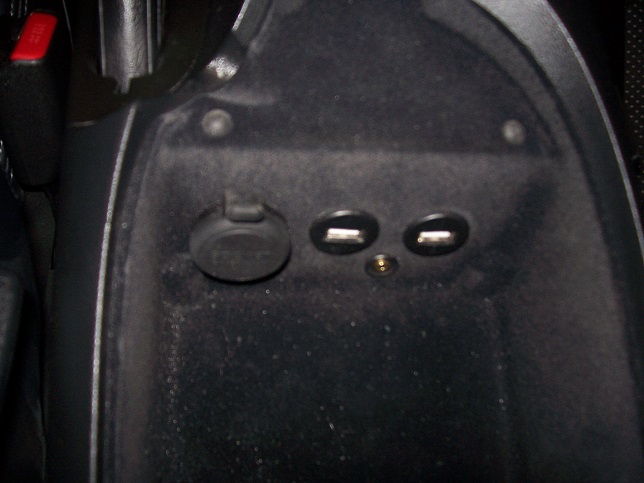
Yep, to use CarPlay it has to be plugged in via USB. The guys who installed it for me added some USB ports in the center console.


Several of the Pioneer units come with built-in nav (depends on which model you get), which is actually pretty good. CarPlay nav is good, and useful because you can pull locations from text messages and emails which is really helpful. You can't pinch-zoom on the CarPlay interface though, which sucks.


Bluetooth quality is ok, the Pioneer unit sometimes has connection issues which can be resolved by switching to another input (like Sirius) then back to Bluetooth to get it to sync the music library. The CarPlay interface is much nicer for music as it has a far superior layout.


Hoping they add more apps for CarPlay, would love to see Waze support.

Cool thanks a lot for all that info!!


Sent from my iPhone using Tapatalk
Swindler is offline   Reply With Quote
Old 03-16-2015, 08:36 PM   #2 (permalink)
Base Member
 
Join Date: Feb 2015
Location: Florida
Posts: 100
Drives: Nissan 370Z
Rep Power: 12
Corona is on a distinguished road
Default

Quote:
Originally Posted by Swindler View Post
Cool thanks a lot for all that info!!


Sent from my iPhone using Tapatalk
Sorry slammed with work. I'll echo what swindler said. I have mine hooked up via USB. I also have the option of AV/HDMI connection which allows me the use of Pioneer apps. Eh, its ok. CarPlay and standard Pioneer HU are good enough. I wouldn't spend the coin on the Apple AV/HDMI adapter.

The only units worth considering are 4000NEX or 8000NEX IMO. 4000NEX and 8000NEX have the same 7" screen and HU features. The only difference between the two is that the 8000NEX is a capacitive touch screen (glossy) and it comes pre-loaded with NAV on the HD. 4000NEX uses a resistive touch screen (matte).

I personally preferred the resistive screen for the matte finish. I found the capacitive was too reflective for my taste. Colors are slightly better on the 8000NEX with the screen but I took that as a trade off. FL sun is constant, lol. I also decided with CarPlay the pre-installed NAV maps wasn't a deciding factor. You will notice that Pioneer doesn't even allow you to compare the 4000NEX against the other models in the NEX line because spec for spec the 4000NEX is so close to the top model. You honestly cannot go wrong with either. Pioneer NAV has never done me wrong.

You will notice that Pioneer is releasing "new" NEX models. ie. 4100NEX and 8100NEX. The "100" just means it has CarPlay pre-installed on the HU. The 4000NEX (I can only assume the same for the 8000NEX) required a firmware update. Literally takes a $5 2 GB SD card and you download the firmware from your computer and plug it into the HU. Takes *maybe* 10mins from start to finish. 20 mins if you include the trip to the store, lol.

Super easy, save the move and get "last years" 4000/8000 model.

Bluetooth is ok with the windows up. No one complains that I sound distant or hard to hear. This is with full HKS exhaust . Maps is great because you can pull up previously text'd addresses or use your phone as the interface to your HU. So no more typing on the screen. Pull up your phone/or use Siri to get directions. Same goes for Music/iHeartRadio/etc. Honestly, Im very impressed with the "beta" CarPlay. I paid about $500 shipped for mine.

Not sure what work you'll need to additional to make it work if you have Bose Nav/Audio. I know those can be a PITA. Hopefully this helps some.

Corona is offline   Reply With Quote
Old 03-17-2015, 03:33 AM   #3 (permalink)
Base Member
 
dotcomee's Avatar
 
Join Date: Jun 2014
Location: Austin, TX.
Posts: 77
Drives: 370Z Touring/Sport
Rep Power: 12
dotcomee is on a distinguished road
Default

Quote:
Originally Posted by Corona View Post
You will notice that Pioneer is releasing "new" NEX models. ie. 4100NEX and 8100NEX. The "100" just means it has CarPlay pre-installed on the HU. The 4000NEX (I can only assume the same for the 8000NEX) required a firmware update. Literally takes a $5 2 GB SD card and you download the firmware from your computer and plug it into the HU. Takes *maybe* 10mins from start to finish. 20 mins if you include the trip to the store, lol.

Super easy, save the move and get "last years" 4000/8000 model.
:
The new 4100/8100 do say they are Android Auto compatible which the 4000/8000 aren't. I don't know whether they support it out of the box or if it's another one of Pioneer's "Yeah we will support sometime in the distant future" like they did with CarPlay.

Quote:
Originally Posted by Corona View Post
Thats a GREAT clean install! I wish I ran both USB cables up thru the console. I did the HDMI and USB#1. I like how it sits flush. May have to make a similar adapter. Do you know what he used?
Not sure, I will try to find out and PM you.

Last edited by dotcomee; 03-17-2015 at 03:35 AM.
dotcomee is offline   Reply With Quote
Old 03-17-2015, 04:24 AM   #4 (permalink)
Base Member
 
Swindler's Avatar
 
Join Date: Oct 2013
Location: Central CA
Age: 36
Posts: 219
Drives: 2014 370Z PW Manual
Rep Power: 13
Swindler is on a distinguished road
Default

Quote:
Originally Posted by Corona View Post
Sorry slammed with work. I'll echo what swindler said. I have mine hooked up via USB. I also have the option of AV/HDMI connection which allows me the use of Pioneer apps. Eh, its ok. CarPlay and standard Pioneer HU are good enough. I wouldn't spend the coin on the Apple AV/HDMI adapter.

The only units worth considering are 4000NEX or 8000NEX IMO. 4000NEX and 8000NEX have the same 7" screen and HU features. The only difference between the two is that the 8000NEX is a capacitive touch screen (glossy) and it comes pre-loaded with NAV on the HD. 4000NEX uses a resistive touch screen (matte).

I personally preferred the resistive screen for the matte finish. I found the capacitive was too reflective for my taste. Colors are slightly better on the 8000NEX with the screen but I took that as a trade off. FL sun is constant, lol. I also decided with CarPlay the pre-installed NAV maps wasn't a deciding factor. You will notice that Pioneer doesn't even allow you to compare the 4000NEX against the other models in the NEX line because spec for spec the 4000NEX is so close to the top model. You honestly cannot go wrong with either. Pioneer NAV has never done me wrong.

You will notice that Pioneer is releasing "new" NEX models. ie. 4100NEX and 8100NEX. The "100" just means it has CarPlay pre-installed on the HU. The 4000NEX (I can only assume the same for the 8000NEX) required a firmware update. Literally takes a $5 2 GB SD card and you download the firmware from your computer and plug it into the HU. Takes *maybe* 10mins from start to finish. 20 mins if you include the trip to the store, lol.

Super easy, save the move and get "last years" 4000/8000 model.

Bluetooth is ok with the windows up. No one complains that I sound distant or hard to hear. This is with full HKS exhaust . Maps is great because you can pull up previously text'd addresses or use your phone as the interface to your HU. So no more typing on the screen. Pull up your phone/or use Siri to get directions. Same goes for Music/iHeartRadio/etc. Honestly, Im very impressed with the "beta" CarPlay. I paid about $500 shipped for mine.

Not sure what work you'll need to additional to make it work if you have Bose Nav/Audio. I know those can be a PITA. Hopefully this helps some.

Hey man I appreciate all that for sure, I think I'm leaning toward the 4000NEX. I'm gonna go see if they have any to look at at a local car audio place in the morning and get an estimate for the install. I want to know how they would set me up in the console with those usb ports too lol.
Swindler is offline   Reply With Quote
Old 03-17-2015, 10:00 AM   #5 (permalink)
Base Member
 
Join Date: Feb 2015
Location: Florida
Posts: 100
Drives: Nissan 370Z
Rep Power: 12
Corona is on a distinguished road
Default

Quote:
Originally Posted by Swindler View Post
Hey man I appreciate all that for sure, I think I'm leaning toward the 4000NEX. I'm gonna go see if they have any to look at at a local car audio place in the morning and get an estimate for the install. I want to know how they would set me up in the console with those usb ports too lol.
I know shops were quoting me like $150 for install and $100 for back-up cam. I went ahead and did it myself. I have never done an HU install before but have done many DIYs for mechanical work. Took me about 4-5 hrs and I went slow.

Side note, I went with this back-up cam (http://www.amazon.com/gp/product/B00...?ie=UTF8&psc=1). Cannot beat it for OEM look at $15 shipped with Prime. Very good day images. Little image noise at night but does the job. I went and replaced license plate lights with LEDs and that improved image quality.
Corona is offline   Reply With Quote
Reply

Bookmarks


Posting Rules
You may not post new threads
You may not post replies
You may not post attachments
You may not edit your posts

BB code is On
Smilies are On
[IMG] code is On
HTML code is Off
Trackbacks are On
Pingbacks are On
Refbacks are On


Similar Threads
Thread Thread Starter Forum Replies Last Post
[FOR SALE] ALPINE ixa w407 touch screen stereo jewnbug Parts for sale (Private Classifieds) 2 10-29-2013 11:45 AM
Ipod Touch wont display on the Nav screen f370z Audio & Video 9 03-03-2012 10:48 PM
touch screen js1 Audio & Video 1 11-05-2010 04:03 PM
Touch screen protectors? Zcott Audio & Video 3 10-23-2009 10:44 AM
Next from Apple: A Large-Screen iPod Touch? (PC World) Asheth Audio & Video 4 01-01-2009 02:43 AM


All times are GMT -5. The time now is 03:44 AM.


Powered by vBulletin® Version 3.8.4
Copyright ©2000 - 2026, Jelsoft Enterprises Ltd.
Search Engine Optimization by vBSEO 3.6.0 PL2