
|
Originally Posted by dotcomee I have an 8000nex, they look similar though: Thanks!! How do you like it? I was reading that with the iPhone it has to be plugged
|
|||||||
 |
|
|
LinkBack | Thread Tools | Display Modes |
|
|
 03-16-2015, 02:34 PM
|
#1 (permalink) | |
|
Base Member

Join Date: Oct 2013
Location: Central CA
Age: 37
Posts: 219
Drives: 2014 370Z PW Manual
Rep Power: 13  |

Quote:
Thanks!! How do you like it? I was reading that with the iPhone it has to be plugged in to use CarPlay. But i don't even see anywhere to plug it in in the pictures. Also does it already come with navi or does it have to be paid for separately? Although I did also read that the phones navi works nicely too when connected... and how is the Bluetooth quality for you? Sent from my iPhone using Tapatalk |
|

|

|
|
03-16-2015, 04:39 PM
|
#2 (permalink) |
|
Base Member
 
Join Date: Jun 2014
Location: Austin, TX.
Posts: 77
Drives: 370Z Touring/Sport
Rep Power: 13 |
Yep, to use CarPlay it has to be plugged in via USB. The guys who installed it for me added some USB ports in the center console.
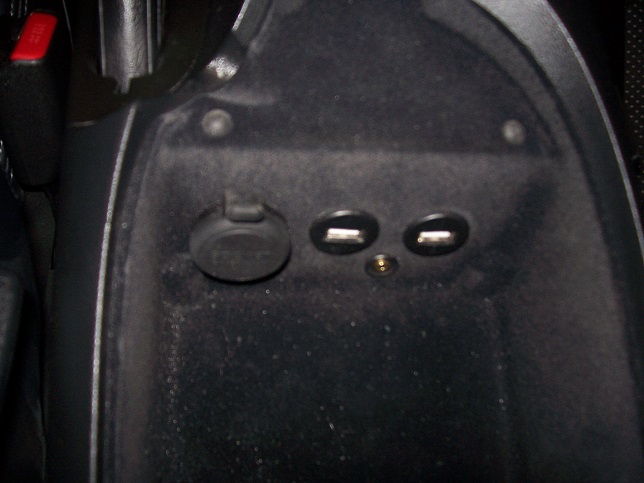 Several of the Pioneer units come with built-in nav (depends on which model you get), which is actually pretty good. CarPlay nav is good, and useful because you can pull locations from text messages and emails which is really helpful. You can't pinch-zoom on the CarPlay interface though, which sucks. Bluetooth quality is ok, the Pioneer unit sometimes has connection issues which can be resolved by switching to another input (like Sirius) then back to Bluetooth to get it to sync the music library. The CarPlay interface is much nicer for music as it has a far superior layout. Hoping they add more apps for CarPlay, would love to see Waze support. |
|
|
|
|
03-16-2015, 07:48 PM
|
#3 (permalink) | |
|
Base Member
Join Date: Oct 2013
Location: Central CA
Age: 37
Posts: 219
Drives: 2014 370Z PW Manual
Rep Power: 13 |
Quote:
Cool thanks a lot for all that info!! Sent from my iPhone using Tapatalk |
|
|
|
|
|
03-16-2015, 08:36 PM
|
#4 (permalink) | |
|
Base Member
Join Date: Feb 2015
Location: Florida
Posts: 100
Drives: Nissan 370Z
Rep Power: 12 |
Quote:
The only units worth considering are 4000NEX or 8000NEX IMO. 4000NEX and 8000NEX have the same 7" screen and HU features. The only difference between the two is that the 8000NEX is a capacitive touch screen (glossy) and it comes pre-loaded with NAV on the HD. 4000NEX uses a resistive touch screen (matte). I personally preferred the resistive screen for the matte finish. I found the capacitive was too reflective for my taste. Colors are slightly better on the 8000NEX with the screen but I took that as a trade off. FL sun is constant, lol. I also decided with CarPlay the pre-installed NAV maps wasn't a deciding factor. You will notice that Pioneer doesn't even allow you to compare the 4000NEX against the other models in the NEX line because spec for spec the 4000NEX is so close to the top model. You honestly cannot go wrong with either. Pioneer NAV has never done me wrong. You will notice that Pioneer is releasing "new" NEX models. ie. 4100NEX and 8100NEX. The "100" just means it has CarPlay pre-installed on the HU. The 4000NEX (I can only assume the same for the 8000NEX) required a firmware update. Literally takes a $5 2 GB SD card and you download the firmware from your computer and plug it into the HU. Takes *maybe* 10mins from start to finish. 20 mins if you include the trip to the store, lol. Super easy, save the move and get "last years" 4000/8000 model. Bluetooth is ok with the windows up. No one complains that I sound distant or hard to hear. This is with full HKS exhaust  . Maps is great because you can pull up previously text'd addresses or use your phone as the interface to your HU. So no more typing on the screen. Pull up your phone/or use Siri to get directions. Same goes for Music/iHeartRadio/etc. Honestly, Im very impressed with the "beta" CarPlay. I paid about $500 shipped for mine. . Maps is great because you can pull up previously text'd addresses or use your phone as the interface to your HU. So no more typing on the screen. Pull up your phone/or use Siri to get directions. Same goes for Music/iHeartRadio/etc. Honestly, Im very impressed with the "beta" CarPlay. I paid about $500 shipped for mine. Not sure what work you'll need to additional to make it work if you have Bose Nav/Audio. I know those can be a PITA. Hopefully this helps some. 
|
|
|
|
|
|
03-17-2015, 03:33 AM
|
#5 (permalink) | ||
|
Base Member
Join Date: Jun 2014
Location: Austin, TX.
Posts: 77
Drives: 370Z Touring/Sport
Rep Power: 13 |
Quote:
Quote:
Last edited by dotcomee; 03-17-2015 at 03:35 AM. |
||
|
|
|
|
03-17-2015, 04:24 AM
|
#6 (permalink) | |
|
Base Member
Join Date: Oct 2013
Location: Central CA
Age: 37
Posts: 219
Drives: 2014 370Z PW Manual
Rep Power: 13 |
Quote:

|
|
|
|
|
|
03-17-2015, 10:00 AM
|
#7 (permalink) | |
|
Base Member
Join Date: Feb 2015
Location: Florida
Posts: 100
Drives: Nissan 370Z
Rep Power: 12 |
Quote:
Side note, I went with this back-up cam (http://www.amazon.com/gp/product/B00...?ie=UTF8&psc=1). Cannot beat it for OEM look at $15 shipped with Prime. Very good day images. Little image noise at night but does the job. I went and replaced license plate lights with LEDs and that improved image quality. |
|
|
|
|
|
03-16-2015, 08:38 PM
|
#8 (permalink) | |
|
Base Member
Join Date: Feb 2015
Location: Florida
Posts: 100
Drives: Nissan 370Z
Rep Power: 12 |
Quote:
Thats a GREAT clean install! I wish I ran both USB cables up thru the console. I did the HDMI and USB#1. I like how it sits flush. May have to make a similar adapter. Do you know what he used? |
|
|
|
|
|
03-16-2015, 11:32 PM
|
#9 (permalink) | |
|
Base Member
Join Date: Aug 2013
Location: CA 92656
Posts: 68
Drives: 370Z M6 Sport
Rep Power: 14 |
Quote:
|
|
|
|
|
|
| Bookmarks |
| Thread Tools | |
| Display Modes | |
|
|
 Similar Threads
|
||||
| Thread | Thread Starter | Forum | Replies | Last Post |
| [FOR SALE] ALPINE ixa w407 touch screen stereo | jewnbug | Parts for sale (Private Classifieds) | 2 | 10-29-2013 11:45 AM |
| Ipod Touch wont display on the Nav screen | f370z | Audio & Video | 9 | 03-03-2012 10:48 PM |
| touch screen | js1 | Audio & Video | 1 | 11-05-2010 04:03 PM |
| Touch screen protectors? | Zcott | Audio & Video | 3 | 10-23-2009 10:44 AM |
| Next from Apple: A Large-Screen iPod Touch? (PC World) | Asheth | Audio & Video | 4 | 01-01-2009 02:43 AM |


 17Likes


 Hybrid Mode


