
|
The mini add a line makes this install really simple. Otherwise, you can just use the hardwire kit that comes with the V1 and tap into one of the lines
|
|||||||
|
|
LinkBack | Thread Tools | Display Modes |
 09-10-2010, 08:58 AM
|
#5 (permalink) |
|
Track Member
Join Date: Feb 2010
Location: Dallas, TX
Posts: 657
Drives: 2010 370Z
Rep Power: 18  |

The mini add a line makes this install really simple. Otherwise, you can just use the hardwire kit that comes with the V1 and tap into one of the lines down there. With the add a line kit, you won't need to touch any other wires.
I bought mine from countryjoycrafts and it was good. Make sure you get the 23mm mount and NOT the 3/4" one as that one is too small. Also for Step 11, you have to cut the wire because there's a connector there that you don't need. That's where you crimp in the add a line kit. Also he says to make sure the add a line kit wire goes to the left, but in my case I had to put it the opposite way because it wouldn't work that way. I guess the add a line kit I used had reversed polarity or something. Also make sure to put one fuse in the top part of the add a line kit cuz it won't work without any (or just read the instructions on how to install it lol). Edit: Also that Z emblem you see was discontinued. They used to have it on the mount but not anymore.
__________________
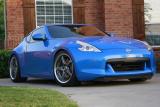
SOLD 12/30/2011 2010 370Z Coupe Monterey Blue 6MT/Touring/Sport/Nav F.I. CBE CF w/ 12" Res | V1 | SecondSkin | Stillen G3 | EVO-R CF B-Pillars | Volk GT-S Ti Gunmetal 19x9.5 +30 F, 19x10.5 +8 R | Swift Spec-R Springs Last edited by tsolin01; 09-10-2010 at 09:40 AM. |

|

|
| Bookmarks |
| Thread Tools | |
| Display Modes | |
|
|


 Threaded Mode

