
|
video of smart top from remote control http://www.youtube.com/watch?v=-Q2dFFQV9VE&feature=related smart top works wile driving up to 25 mph works in revers, can control both windows at same time from the roof
|
|||||||
 |
|
|
LinkBack | Thread Tools | Display Modes |
 07-06-2011, 08:03 PM
|
#1 (permalink) |
|
Base Member
Join Date: Apr 2011
Location: nj
Posts: 23
Drives: 2010 370z roadster
Rep Power: 16  |
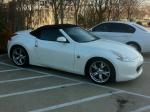
 smart top
video of smart top from remote control
smart top works wile driving up to 25 mph works in revers, can control both windows at same time from the roof switch, can put windows up or down from fob key. will take more videos on request. Def Loving my smart top 
Last edited by Super Moderator II; 07-08-2011 at 01:01 AM. Reason: link fixed |

|

|
|
07-07-2011, 09:26 PM
|
#2 (permalink) |
|
Base Member
Join Date: Feb 2011
Location: Vermont
Posts: 67
Drives: '10 370Z Convt PW M6
Rep Power: 16 |

I'm still waiting to get mine shipped to me that I pre ordered months ago. How did you already get yours???
I do like your video though... because it gives me a good idea of exactly how my car will look when the top is dropping automatically as I have the exact same car as you (same color, same rims) :-) |
|
|
|
|
07-08-2011, 09:26 AM
|
#5 (permalink) |
|
Base Member
Join Date: Apr 2011
Location: nj
Posts: 23
Drives: 2010 370z roadster
Rep Power: 16 |
it probbly takes about 2 minutes to install, i was able to get the first one made, after the other guy i think CRASH the one that sold his car when to mod4cars lab and let them borrow his car to develop it, i was next inline and when they receive their first factory made plug in play i had the opportunity to test it out and make sure it works so now they are confident that this product works and im happy i have the very first one made
)) it is definitely worth the wait it makes the car that much better
|
|
|
|
|
07-08-2011, 09:28 AM
|
#6 (permalink) | |
|
Base Member
Join Date: Apr 2011
Location: nj
Posts: 23
Drives: 2010 370z roadster
Rep Power: 16 |
Quote:
|
|
|
|
|
|
07-21-2011, 05:43 PM
|
#8 (permalink) | |
|
Base Member
Join Date: Sep 2010
Location: Corpus Christi, Texas
Posts: 89
Drives: 370z Roadster
Rep Power: 17 |
Quote:
__________________
Performance||| Stillen G2 Intake, Invidia Gemini CBE, CNT HFC, UpRev Tune||| Exterior ||| 20" Vertini Drifts Gold, BC Coilovers, Evo-R Carbon Fangs, JDM Fog light |||Interior||| Jl 8w7, Jl 250/v2, Red GT-R Start Button, Razo Shifter ||| |
|
|
|
|
|
07-21-2011, 06:07 PM
|
#9 (permalink) |
|
Base Member
Join Date: Feb 2011
Location: Vermont
Posts: 67
Drives: '10 370Z Convt PW M6
Rep Power: 16 |
Well I hope this time it actually ships on 8/1. It used to say 7/1 and as soon as 7/1 hit it got pushed back to 8/1. All month long as I've walked towards my car I think how sweet it would be if the top could already be dropping as I approach.
 
|
|
|
|
|
07-22-2011, 10:39 PM
|
#10 (permalink) |
|
Base Member
Join Date: Feb 2011
Location: Vermont
Posts: 67
Drives: '10 370Z Convt PW M6
Rep Power: 16 |
This just in... mods4cars just posted this on their Facebook page:
"Finally, the SmartTOP for Nissan 370Z Roadster is available. We will ship this Monday! " Sweet... get em while they're hot boys and girls! |
|
|
|
|
07-23-2011, 04:20 AM
|
#11 (permalink) | |
|
Base Member
Join Date: Sep 2010
Location: Corpus Christi, Texas
Posts: 89
Drives: 370z Roadster
Rep Power: 17 |
Quote:

__________________
Performance||| Stillen G2 Intake, Invidia Gemini CBE, CNT HFC, UpRev Tune||| Exterior ||| 20" Vertini Drifts Gold, BC Coilovers, Evo-R Carbon Fangs, JDM Fog light |||Interior||| Jl 8w7, Jl 250/v2, Red GT-R Start Button, Razo Shifter ||| |
|
|
|
|
|
07-28-2011, 06:24 PM
|
#12 (permalink) |
|
Base Member
Join Date: May 2010
Location: Augusta, GA
Posts: 129
Drives: '10 Conv A7 Blk Chry
Rep Power: 17 |
I installed my Smart Top today. Wasn't difficult at all, took maybe 45 min. I love it, so much more convenient than the basic top controls. Now I back out of the garage while the top is lowering and in parking lots, open the top while walking up to the car.
__________________
2010 Roadster, 7AT, Black Cherry, Touring, Navigation, Lighted Kick Plates, Floor and Trunk Mats. |
|
|
|
|
07-28-2011, 07:36 PM
|
#13 (permalink) |
|
Base Member
Join Date: Sep 2010
Location: TN
Posts: 25
Drives: 10 370zr BS 6MT T/SN
Rep Power: 17 |
Installed mine last night. I agree, took about 45 min taking my time. Longest part was deciding if & where to run the usb cable for easier future updates, etc. I ended up running mine into the cabin behind the foldout document holder, but through the square panel at the lower right behind it...you can actually run the cable at the bottom of that and put the panel cover back on it, allowing the cable to sit under the foldout document holder. Very nice to have one touch operation, back out while the top is operating, and use the remote for operating it. Only thing I've noticed so far is that the chirp settings don't seem to do much, as I have mine set to off but the factory chirps still sound with locks/unlocks.
|
|
|
|
|
07-28-2011, 09:34 PM
|
#14 (permalink) |
|
Base Member
Join Date: May 2010
Location: Augusta, GA
Posts: 129
Drives: '10 Conv A7 Blk Chry
Rep Power: 17 |
It seems that the "chrips" they refer to are short horn beeps. I left mine on because I like the little chirps when you lock and unlock the doors. Now I get a very short horn beep each time I press the unlock button on the remote. I plan to turn that off soon.
Also, I tried to disable the auto-door lock feature but my doors still locked at 15mph.
__________________
2010 Roadster, 7AT, Black Cherry, Touring, Navigation, Lighted Kick Plates, Floor and Trunk Mats. |
|
|
|
|
07-28-2011, 11:18 PM
|
#15 (permalink) |
|
Base Member
Join Date: Feb 2011
Location: Vermont
Posts: 67
Drives: '10 370Z Convt PW M6
Rep Power: 16 |
Got mine too, installed it and absolutely love this product/feature. It really is a huge convenience to be able to operate the top with one press of the button (without holding it) and while the vehicle is moving under 25mph. I didn't realize it would like it this much!! Its great for when your pulling into your neighborhood and you can have the top up by the time you pull into your driveway and park your car. Or be able to drop or raise the top at stop lights without the fear of the light turning green too soon and people behind you getting pissed as you are forced to wait while your top completes its function. Overall I'm loving this and think it was well worth it.
Axeman... about the door locks feature. I don't think this module will disable the factory door lock feature. In fact I think they advertise/include the "Auto Door Lock' feature as an additional feature (maybe something they offer on all their modules as an added convenience for vehicles that don't already have that feature (like the Z does). Maybe they didn't realize the car already has it? Or like I said they just add it on all their modules? That would be my guess. What's your guys take on the blinking hazards during top operation (when opening or closing with the key fob)? You keep that feature on or turn them of? I've got mine on right now and I'm not sure how I feel. They blink in an alternating pattern, like police car lights or something. Not sure if I like it, though it is kind of an interesting look. Leaving that on for now. |
|
|
|
|
| Bookmarks |
|
|
 Similar Threads
|
||||
| Thread | Thread Starter | Forum | Replies | Last Post |
| Group Buy for the Smart Top chip | tigershak | Nissan 370Z Roadster (Convertible) | 14 | 12-18-2011 05:25 PM |
| smart key not starting the car.. | jayl | Audio & Video | 6 | 05-07-2011 01:57 PM |
| Smart phone pics risk | wretched_z | The Lounge (Off Topic) | 1 | 03-29-2011 09:09 AM |
| Getting an extra smart key plus wheel key... | Doug&Michelle | Nissan 370Z General Discussions | 25 | 01-10-2011 07:17 AM |







 Linear Mode


