
|
Originally Posted by theDreamer Nothing on the front? Nope
|
|||||||
 |
|
|
LinkBack | Thread Tools | Display Modes |
 02-10-2010, 08:56 PM
|
#16 (permalink) | |
|
Base Member
Join Date: Jul 2009
Location: Palm Harbor, Fl
Age: 38
Posts: 60
Drives: 2009 370z, PG, 6spd
Rep Power: 18  |

Quote:
__________________
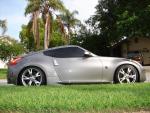
2009 PG w/sports package, 6 spd, clear bra, berk HFC's, FI CBE 18in with CF mufflers, Injen CAI, SPC rear camber arms,in dash NAV, back-up camera, 12in sub in custom box, BC racing BR coilovers, Dynojet-296 rwhp |
|

|

|
|
02-10-2010, 10:33 PM
|
#18 (permalink) | |
|
Base Member
Join Date: Jul 2009
Location: Palm Harbor, Fl
Age: 38
Posts: 60
Drives: 2009 370z, PG, 6spd
Rep Power: 18 |
Quote:
__________________
2009 PG w/sports package, 6 spd, clear bra, berk HFC's, FI CBE 18in with CF mufflers, Injen CAI, SPC rear camber arms,in dash NAV, back-up camera, 12in sub in custom box, BC racing BR coilovers, Dynojet-296 rwhp |
|
|
|
|
|
04-21-2010, 07:44 PM
|
#20 (permalink) |
|
Track Member
Join Date: Dec 2008
Location: Chalfont, PA
Age: 45
Posts: 923
Drives: 09 370Z
Rep Power: 609  |
^^ I don't think your content was posted correctly. It's not showing up.....just a big blank post.
__________________
 Dan F.I. SS CBE 18-R || Llumar 40% tint |
|
|
|
|
04-21-2010, 08:18 PM
|
#24 (permalink) |
|
Enthusiast Member
Join Date: Dec 2009
Location: virginia
Posts: 266
Drives: 10 Nissan 370z 4G M6
Rep Power: 17 |
so alignment is neccesary on rear to go with 20/25mm? one more question, I saw kenwood uses Garmin powered navigation system which is the best naviagation in my opinion, so my question is, how do you upgrade the navigation? I mean, regular garmin nagivations are small enough to bring it inside home and do the update map, but what about this wenwood garmin?
|
|
|
|
|
04-21-2010, 09:22 PM
|
#25 (permalink) |
|
Base Member
Join Date: Jul 2009
Location: Palm Harbor, Fl
Age: 38
Posts: 60
Drives: 2009 370z, PG, 6spd
Rep Power: 18 |
Thanks for fixing my post, I put down 296 RWHP with berk HFC's and injen CAI. Alighnment is only needed because of the coilovers, just spacers should be fine. Also, the garmin can be updated via a usb thumb drive or burn the update to a cd. I'm trying to figure out how to change my icon to the 370z one on my maps...
__________________
2009 PG w/sports package, 6 spd, clear bra, berk HFC's, FI CBE 18in with CF mufflers, Injen CAI, SPC rear camber arms,in dash NAV, back-up camera, 12in sub in custom box, BC racing BR coilovers, Dynojet-296 rwhp |
|
|
|
|
04-21-2010, 09:29 PM
|
#26 (permalink) | |
|
A True Z Fanatic
 
Join Date: Jan 2010
Location: MA Posts:99999999999999
Posts: 3,301
Drives: 370Z 40th Aniversary
Rep Power: 26 |
Quote:
How to Install: Connect your Garmin GPS device to your computer. If you're downloading it from the website: Click Download. Click Open, if necessary. Click Extract. Browse to find the “Garmin/vehicle” folder on the Garmin drive. You may need to create the vehicle folder. Double-click the Unplug or Eject icon in your system tray. Click Stop, and then click OK. Unplug the USB cable from your Garmin GPS device. How to change your ride: On your GPS device, touch Settings. Select Map. Select Vehicle. Choose your favorite vehicle.
__________________

Last edited by Xan; 04-21-2010 at 09:31 PM. |
|
|
|
|
|
04-21-2010, 11:31 PM
|
#28 (permalink) | |
|
A True Z Fanatic
Join Date: Jan 2010
Location: MA Posts:99999999999999
Posts: 3,301
Drives: 370Z 40th Aniversary
Rep Power: 26 |
Quote:
__________________
|
|
|
|
|
|
04-21-2010, 11:39 PM
|
#29 (permalink) |
|
A True Z Fanatic
Join Date: Jun 2009
Location: Naples, Florida
Posts: 3,041
Drives: 09 Fairlady Z
Rep Power: 1067 |
Omg, that 370Z car icon is tits, lol It even matches my PW color
 Hey Josh88, when you got your coilovers installed, did they allign it to the stock specs? Hey Josh88, when you got your coilovers installed, did they allign it to the stock specs?
|
|
|
|
|
04-22-2010, 06:33 AM
|
#30 (permalink) |
|
Base Member
Join Date: Jul 2009
Location: Palm Harbor, Fl
Age: 38
Posts: 60
Drives: 2009 370z, PG, 6spd
Rep Power: 18 |
I installed the coilovers and spc rear camber arms myself and then took it to a shop to get it aligned. It's close to factory spec in the front and around -2 degrees of camber in the rear... Tires are wearing evenly so I think the alignment is good. Really loving the BC coilovers, just hate that I have to remove the rear plastics to adjust the rear dampening.
__________________
2009 PG w/sports package, 6 spd, clear bra, berk HFC's, FI CBE 18in with CF mufflers, Injen CAI, SPC rear camber arms,in dash NAV, back-up camera, 12in sub in custom box, BC racing BR coilovers, Dynojet-296 rwhp |
|
|
|
|
| Bookmarks |
|
|
 Similar Threads
|
||||
| Thread | Thread Starter | Forum | Replies | Last Post |
| My gallery | bluzman | Member's 370Z Gallery | 8 | 03-19-2015 08:54 PM |
| zZSportZz's Magnetic Black 370Z Gallery | zZSportZz | Member's 370Z Gallery | 11 | 07-01-2009 09:50 AM |
| wheel gallery?? | zcoupe09 | Wheels & Tires | 20 | 05-26-2009 11:11 AM |
| Member’s 370Z Gallery section launched! | AK370Z | Announcements | 5 | 03-11-2009 03:47 AM |
| Member’s 370Z Gallery section launched! Members, read this first! | AK370Z | Member's 370Z Gallery | 0 | 03-03-2009 12:00 AM |




 Linear Mode


